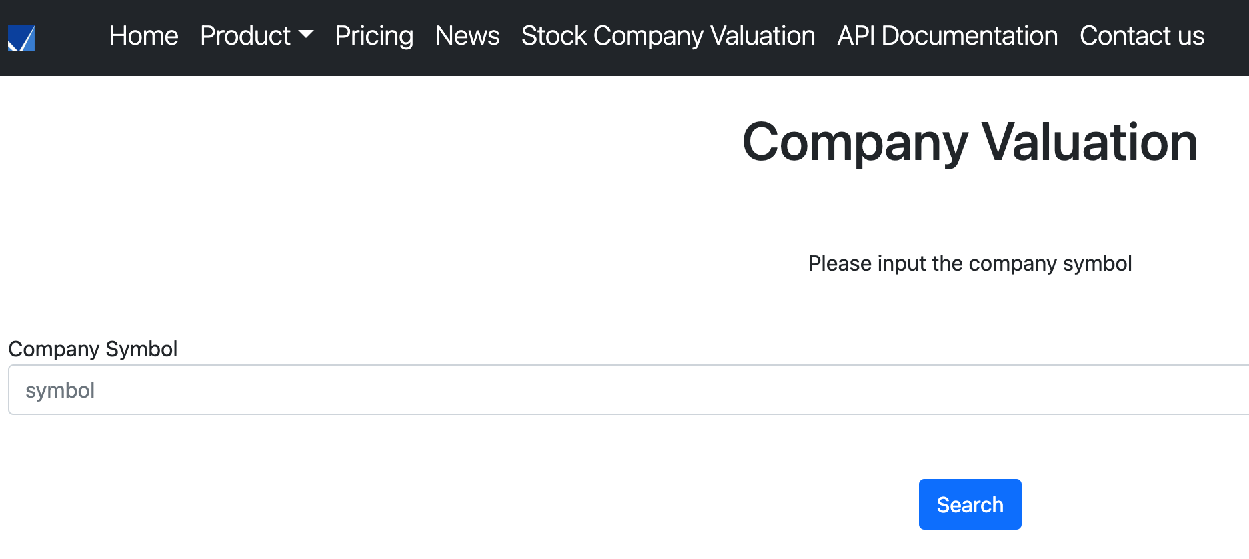
A search box or search bar is a popular function applied on Web applications for visitors to look up things you are finding. A great UX search function can hugely shorten the information search journey and enhance the user experience. In this article, I will go through how to set up a fundamental search function using Flask and return data in the panda’s data frame.
Ingredients on Flask Search Bar Plus Dynamic Data Table Return Using Pandas
Table of Contents
- Search Bar
- Search Result and Easy2Digital API
- Full Python Script of Web App Search Function using Flask and Pandas
- FAQ
Search Bar
Adding a search bar needs a form method and search type of input method added in the clientside HTML script folder. In Flask, we need to create a new HTML script saved in the template folder. Here are the codes as follows:
Please be sure to check two variable values. One is to add the route name “symbolResult” in the action parameter which is the same as the Flask route name you create in the Python script file.
The other is the input id value must be the same as the form name value on the server side. I will elaborate more in a moment.
Search Result and Buyfromlo API
After having created the search bar page or a search bar function embedded on any pages you like. Now we need to develop a search result data return after any users search. Basically, the data communication includes 2 sections – Server Side and Client Side
Server Side – Python, Pandas
First thing first, we need to create a route to return the. search result to the user. The route name here must be the same as the client-side HTML form action name. It’s for connecting them together.
Then, we need to create a form variable to capture the keyword users’ input to look up information. And the value in the get() must be the same as the ID in the form of the client-side mentioned above.
Additionally, based on the keyword, we can use it to connect our database. Here I take the Buyfromlo API for example and I select the financial ratio one. If you are interested in the Buyfromlo API collection. Please check out more details on this page.
We use the request methods and add related parameters in the Easy2Digiatal API endpoint to fetch the data related to the keyword from the search bar.
Last but not least, for returning a table of data to display in the search result, we can leverage the panda’s data frame and the code sample is as follows:
financialRatioDatais for adding the table headersRow_datais for adding the value from each header
Client Side – Html, CSS, Jinja
When the server-side code and route are ready, it returns the information related to the search keyword back to the client side. The question is how the client side in HTML, and CSS can display the data from the server side. Jinja2 and for loop, zip() methods can be used in this case. Here are the codes as follows:
Full Python Script of Web App Search Bar Using Flask and Pandas
If you are interested in the Buyfromlo API, and the full python script of Chapter 65 – Flask Search Bar Plus Dynamic Data Table Return Using Pandas and Python, please subscribe to our newsletter by adding the message “Chapter 65”. We would send you the script immediately to your mailbox.
- If you are interested in getting the full version of the script and vibe coding prompt mentioned in this article, please subscribe to our Youtube Channel and comment “search bar” in the following video (Search Bar Script and Vibe Coding Prompt)
- Support our channel through PayPal (paypal.me/Easy2digital)
- Follow our Facebook page
- Sign up for our weekly newsletter to receive Easy2Digital latest articles, videos, and discount code on Buyfromlo products and digital software